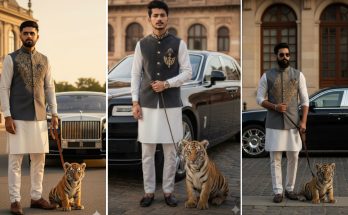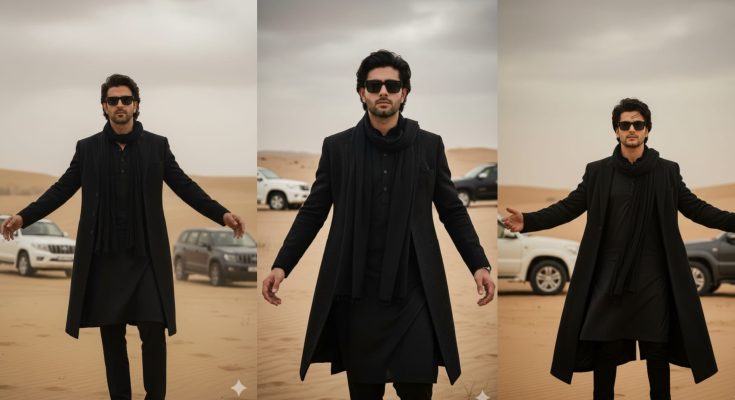
Have you noticed those stunning, ultra-realistic AI photos on Instagram and TikTok where a person looks incredibly sharp in a cinematic black coat? This “Black Coat” trend is taking the internet by storm. It’s all about mystery, elegance, and high-fashion aesthetics. But the secret isn’t just the AI—it’s the prompt.
In 2026, Google Gemini has become a powerhouse for generating lifelike images. However, getting that perfect “Black Coat” look requires a specific set of instructions. If you’ve been struggling with blurry results or generic faces, you are in the right place.
At ApkMale, we stay ahead of AI trends to give you the exact “formulas” for success. In this guide, we will provide you with the exact Gemini prompts and settings to create your own viral black coat masterpiece.
Why the “Black Coat” Aesthetic is Trending
The black coat symbolizes power, sophistication, and a “main character” vibe. Whether it’s a long wool overcoat in a snowy street or a sleek leather trench coat under neon city lights, this look captures attention instantly.
AI models like Gemini are now advanced enough to render the texture of fabric—like the soft fuzz of wool or the subtle shine of leather. By using the premium AI tools shared on ApkMale, you can generate these images in seconds and use them for your profile pictures, wallpapers, or social media content.
Top Gemini Prompts for the Black Coat Trend
To get the best results, copy and paste these prompts into Google Gemini. Feel free to tweak the details (like hair color or background) to match your style.
1. The Cinematic Urban Look
“Generate a hyper-realistic, 8k photo of a stylish [man/woman] walking through a rainy Tokyo street at night. They are wearing a long, premium black wool overcoat with the collar popped. Cinematic lighting, neon reflections on the wet pavement, sharp focus on the facial features, photorealistic texture.”
2. The Professional Studio Portrait
“A professional studio portrait of a person wearing a high-end black velvet coat. Minimalist grey background, soft Rembrandt lighting, highlighting the texture of the coat and the person’s confident expression. Highly detailed, 4k, fashion photography style.”
3. The Mysterious Winter Vibe
“A cinematic shot of a person standing in a pine forest during a light snowfall. They are wearing a heavy black puffer coat with a fur hood. The contrast between the white snow and the deep black coat is sharp. Realistic skin tones, 8k resolution, atmospheric depth.”
At ApkMale, we recommend using Gemini’s “Advanced” mode for these prompts to ensure the highest level of detail.
Step-by-Step Guide: How to Generate and Edit Your AI Photo
Creating the image is only half the battle. To make it truly “Trending,” you need a bit of post-processing.
Step 1: Open Google Gemini
Access Gemini through your browser or the official app. Ensure you are logged in to save your generations.
Step 2: Input the Prompt
Use one of the prompts provided above. If the first result isn’t perfect, click “Generate more” or add more descriptive words like “gloomy,” “luxury,” or “sharp jawline.”
Step 3: Refine the Image
If you like the coat but want to change the person’s face, you can use the “Inpainting” or “Edit” feature in Gemini to brush over the face and re-prompt it.
Step 4: Upscale for High Quality
AI images can sometimes look a bit soft. Use a dedicated AI Upscaler (you can find pro versions on ApkMale) to turn your image into a crisp 4K file.
Step 5: Final Color Grading
Take your image into an editor like Lightroom or VN. Darken the shadows and increase the “Clarity” to make the black coat look even deeper and more realistic.
Benefits of Using Gemini for AI Trends
Why use Gemini over other AI generators for this specific trend?
- Speed: Gemini generates high-quality images faster than almost any other model in 2026.
- Accuracy: It understands complex fashion terms like “trench coat,” “lapels,” and “overcoat” very well.
- Integration: Since it’s a Google product, you can easily save your creations to Google Photos or share them instantly.
- Safety: Gemini has built-in filters to ensure all generated content is safe for social media platforms.
By following the tutorials on ApkMale, you can learn how to combine Gemini’s speed with professional editing tricks.
Common Problems & Simple Solutions
Problem: The coat looks “flat” or just like a black blob.
- Solution: Add words like “rim lighting,” “fabric texture,” or “visible stitching” to your prompt. This tells the AI to add light to the edges of the coat, giving it 3D depth.
Problem: The face looks distorted or “AI-ish.”
- Solution: Specify the camera lens in your prompt. Adding “shot on 85mm lens” or “Portrait photography” forces the AI to focus on realistic facial proportions.
Problem: I can’t find the “Generate Image” button.
- Solution: Ensure you are in a region where Gemini’s image generation is enabled. Alternatively, check ApkMale for the latest Gemini app updates that bypass regional bugs.
Tips for Going Viral with Your Black Coat AI Photo
- Use a “Before & After”: Show the text prompt you used followed by the final edited image. People love seeing the “magic” behind the AI.
- Add Music: On Instagram, pair your image with a trending “Phonk” or “Dark Techno” track.
- Sync with Transitions: If you have multiple generations, time the switch between photos to the beat of the music.
- Consistency: Keep the “Black Coat” theme across your profile for a few posts to build an aesthetic brand.
Frequently Asked Questions (FAQs)
1. Is Google Gemini image generation free? Yes, Google offers a free tier for Gemini that allows for image generation. For higher resolution and faster processing, there is a “Gemini Advanced” subscription.
2. Can I use these AI images for commercial purposes? In 2026, Google’s policy generally allows you to use your generations, but always check the latest Terms of Service. ApkMale recommends using them primarily for personal branding and social media.
3. Which is better for the Black Coat trend: Midjourney or Gemini? Midjourney is excellent for art, but Gemini is often better for “Realistic” human portraits and is much easier for beginners to use.
4. How do I make the black color look deeper? In your prompt, use the term “True Black” or “Deep Obsidian.” In post-editing, lower the “Blacks” and “Shadows” sliders.
5. Are the prompts on ApkMale updated? Yes! We constantly update our prompt libraries to match the latest AI model updates (like Gemini 2.0 or 3.0).
Conclusion
The Black Coat Trending Gemini Prompt is a perfect example of how AI can turn a simple idea into a stunning visual reality. Whether you want to look like a cinematic hero or a high-fashion model, the right prompt is your key to the “Main Character” look.
Explore the latest AI tools and premium apps on ApkMale to take your creations to the next level. Don’t just follow the trend—master it!