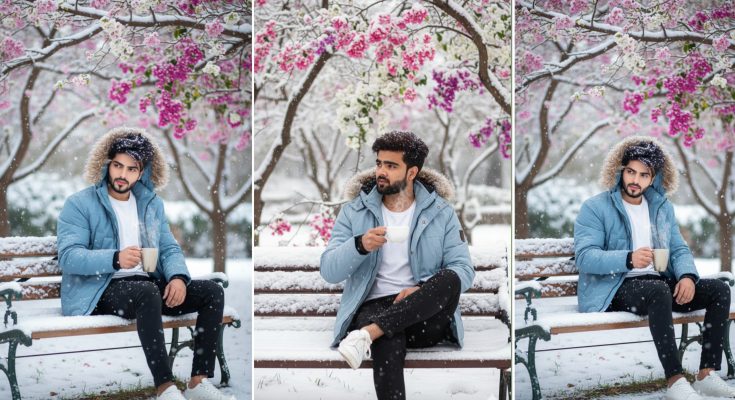
Imagine a silent, frozen landscape where the only sound is the soft crunch of snowflakes hitting the ground. In the center of this white wilderness sits a man on a wooden chair, looking calm and thoughtful as the winter storm swirls around him. This “Man Sitting on Chair in Snowfall” aesthetic has become a massive viral trend on Instagram and TikTok in 2026.
It captures a sense of “Main Character” energy—peaceful, powerful, and mysterious. But how do creators get that perfect, hyper-realistic look where every snowflake and fabric texture is visible? The secret lies in the Gemini prompt.
At ApkMale, we stay ahead of these AI trends to give you the exact “formulas” for success. In this guide, we will provide you with the exact prompts and settings to create your own cinematic winter masterpiece using Google Gemini.
Why the “Snowy Chair” Aesthetic is Trending
The contrast between a stationary person and a dynamic snowfall creates a visually stunning effect. In 2026, AI models like Google Gemini have mastered “Particle Physics,” meaning the snow looks real rather than like a cheap filter.
Whether it’s a man in a luxury black coat or a traditional outfit, this trend works because it tells a story of resilience and calm. By using the premium AI tools and techniques discussed on ApkMale, you can generate these images in seconds for your profile pictures, wallpapers, or viral reels.
Top Gemini Prompts for the Snowfall Trend
To get the most realistic results, copy and paste these prompts into Gemini. Feel free to tweak the hair color, clothing style, or background to match your personal vibe.
1. The Luxury Cinematic Look
“A hyper-realistic 8k photo of a handsome man sitting comfortably on a vintage velvet chair in the middle of a heavy snowfall. He is wearing a long, premium black wool overcoat. Soft cinematic lighting, snowflakes resting on his shoulders and hair, sharp focus on facial features, blurry forest background (bokeh), photorealistic texture, shot on an 85mm lens.”
2. The Traditional Village Vibe
“A cinematic shot of a man sitting on a traditional wooden chair outside a rustic cabin during a snowstorm. He is wearing a thick shawl and ethnic winter wear. The warm orange light from the cabin window reflects on the white snow. Realistic textures, 4k resolution, atmospheric depth, peaceful expression.”
3. The Modern Urban Minimalist
“A professional studio-style photo of a man sitting on a modern metallic chair in a snowy city square at night. He is wearing a stylish puffer jacket. Neon city lights in the distance, high-contrast lighting, deep shadows, 8k resolution, fashion photography style.”
At ApkMale, we recommend using these prompts with “High Detail” settings to ensure the snow particles don’t look blurry.
Step-by-Step Guide: How to Generate and Edit Your AI Photo
Creating a viral-worthy image involves more than just a single click. Follow this professional workflow:
Step 1: Open Google Gemini
Access Gemini through your browser or the mobile app. For the best 2026 features, ensure you are using the latest version. If you face any app issues, check the tech troubleshooting guides on ApkMale.
Step 2: Input and Refine the Prompt
Paste one of the prompts provided above. If the AI gives you a result you don’t like, simply reply with “make the snow heavier” or “change the chair to a leather one.”
Step 3: Check for “Particle Realism”
Look closely at the snow. It should look like it is actually “falling” or “resting” on the man. If it looks fake, add the keyword “physics-based snow rendering” to your prompt.
Step 4: Upscale for 4K Quality
Standard AI outputs can lose detail when zoomed in. Use an AI Upscaler (available via the tools on ApkMale) to convert your image into a crisp, high-resolution file.
Step 5: Final Editing
Take your upscaled image into an editor like Lightroom or VN. Increase the “Clarity” and “Sharpening” to make the snowflakes pop. Add a slight “Blue Tint” to the shadows to enhance the cold, winter feeling.
Benefits of Using Gemini for Winter-Themed Art
Why is Gemini the preferred tool for this trend in 2026?
- Texture Recognition: Gemini is excellent at differentiating between the “fuzz” of a wool coat and the “shine” of a metallic chair.
- Natural Lighting: It excels at “Cold Lighting” effects, which are crucial for making snow look white rather than grey.
- Speed: You can generate multiple variations in seconds, allowing you to pick the perfect shot for your social media.
- Ease of Use: You don’t need to be a tech expert; just talk to the AI like you are talking to a friend.
By keeping your apps updated through ApkMale, you ensure you have access to the latest Gemini image-generation engines.
Common Problems & Simple Solutions
Problem: The snow looks like white lines or streaks.
- Solution: Add the term “frozen motion” or “shutter speed 1/1000” to your prompt. This tells the AI to capture the snowflakes as distinct dots rather than blurry lines.
Problem: The man’s face looks “generic” or unrealistic.
- Solution: Be specific about the facial features. Use terms like “sharp jawline,” “intense eyes,” or “rugged beard.” You can also mention a specific camera lens like “35mm” for a more human look.
Problem: The background is too distracting.
- Solution: Use the keyword “Depth of Field” or “Bokeh” to blur the background, making the man and the chair the main focus of the image.
Tips for Viral Engagement with Snowfall AI Photos
- Use a “Wait for the Drop” Edit: Create a video where the screen is black, then the image appears exactly when the music beats.
- Add Wind Sound Effects: When posting on Reels, add a subtle “Wind Howling” sound effect to make the image feel more immersive.
- Share the Prompt: Transparency is a big trend in 2026. Share your prompt in the caption; it encourages people to comment and save your post.
- Try Different Outfits: Experiment with different colors. A “Red Coat” against “White Snow” creates a powerful visual contrast that stops people from scrolling.
Frequently Asked Questions (FAQs)
1. Is it free to generate these images on Gemini? Yes, Google Gemini offers free image generation. For higher priority and better resolution, there is a “Gemini Advanced” tier, which we often review on ApkMale.
2. Can I use these AI photos for my AdSense-monetized blog? Generally, yes. However, ensure you follow Google’s latest AI disclosure policies. Adding your own unique editing and context (like this guide) makes the content much more valuable.
3. Which is better for the snowfall trend: Sora or Gemini? Sora is amazing for video, but for a high-quality “Still” image that you want to use as a profile picture or wallpaper, Gemini is currently faster and more accessible.
4. How do I make the man look more like me? You can upload a reference photo to Gemini and ask it to “Use this person’s facial structure in a snowfall chair setting.”
5. Are the prompts on ApkMale safe to use? Absolutely. We provide tested, safe, and creative prompts that follow all standard AI safety guidelines.
Conclusion
The Gemini Man Sitting On Chair In Snowfall prompt is more than just a digital image; it’s a mood. It represents the quiet strength we all strive for. By using the prompts and techniques in this guide, and keeping your creative tools updated via ApkMale, you are ready to master this viral trend.
The world of AI is moving fast, so don’t be afraid to experiment. Change the chair, change the clothes, and make the trend your own. Happy creating!