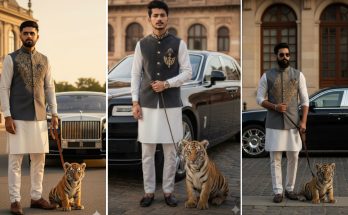
Have you ever scrolled through your feed and seen an AI-generated image that looks so crisp, so clean, and so “aesthetic” that you just had to stop? In 2026, the “Half White Outfit” trend is exactly that. It is a style that balances purity with high-fashion contrast, often placing a subject in a stunning white ensemble against a dramatic, colorful background.
But how do these creators get the fabric to look so real? How do they make the lighting hit the white cloth without overexposing the whole image? The secret is all in the Google Gemini prompt.
At ApkMale, we are dedicated to helping you master the latest AI tools. Whether you want to create a viral Reel or a new profile picture, this guide will give you the exact prompts and settings to make the “Half White Outfit” trend work for you.
Why the “Half White Outfit” is Dominating 2026
White is a difficult color for AI to get right. It often looks like a flat white blob. However, with the latest updates to Google Gemini, the AI can now render shadows, folds, and different textures—like silk, cotton, or leather—within a white outfit.
The “Half White” style usually refers to a look where the upper or lower half of the outfit is brilliant white, contrasted with another bold color or a cinematic environment. Using the premium AI resources we discuss on ApkMale, you can achieve this high-end look in seconds.
Top Google Gemini Prompts for the Half White Trend
To get started, copy these prompts into Gemini. You can adjust the gender, location, and specific clothing items to fit your vision.
1. The Urban Chic Look
“A hyper-realistic 8k photo of a stylish man walking through a modern glass-and-steel city. He is wearing a crisp white premium blazer paired with dark charcoal trousers. The sunlight is reflecting off the white fabric, showing realistic folds and textures. Cinematic lighting, sharp focus on facial features, 35mm lens style, photorealistic.”
2. The Traditional Village Contrast
“A cinematic shot of a young woman standing in a lush green field. She is wearing a half-white traditional ethnic outfit with intricate gold embroidery. The bright white contrast against the deep green nature looks stunning. Soft sunset lighting, highly detailed fabric, 4k resolution, peaceful atmosphere.”
3. The Minimalist Studio Portrait
“A professional fashion photography shot of a model wearing a minimalist half-white silk outfit. Plain beige background, soft Rembrandt lighting, highlighting the texture of the white silk and the shadows in the drapes. High contrast, 8k resolution, clean and sophisticated.”
At ApkMale, we recommend adding keywords like “rim lighting” to these prompts to ensure the white edges of the outfit stand out perfectly.
Step-by-Step Guide: How to Generate Your Viral Image
Creating the perfect AI image is a journey. Follow these steps to ensure yours is ready for social media.
Step 1: Open Google Gemini
Access Gemini through your official app or browser. If you are looking for the latest version of the app with all features enabled, visit ApkMale for our latest tech recommendations.
Step 2: Input the “Half White” Prompt
Use one of the prompts shared above. If you want a specific vibe—like “Dark Academia” or “Cyberpunk”—add those words at the beginning of the prompt.
Step 3: Refine the Fabric Texture
If the white looks too flat, tell Gemini: “Add more shadows to the white fabric” or “Make the material look like heavy wool.” This adds the depth needed for a “real” photograph look.
Step 4: Upscale the Result
Most AI generators produce images that look good on a phone but blurry on a laptop. Use an AI Upscaler (you can find these in the tools section of ApkMale) to turn your image into a high-definition 4K masterpiece.
Step 5: Final Color Grading
Open your image in a mobile editor. Increase the “Contrast” slightly to make the white pop, and lower the “Highlights” so the white areas don’t lose their detail.
Benefits of Using Gemini for Fashion AI
Why is Gemini the go-to tool for this trend on ApkMale?
- Smart Color Balance: Gemini is excellent at keeping white “true” without letting it turn yellow or blue.
- Complex Textures: It understands the difference between a white hoodie and a white tuxedo.
- Speed: You can iterate through five different outfit styles in less than a minute.
- Mobile-Friendly: You can do all of this while sitting in a cafe or traveling, right from your phone.
Common Problems & Simple Solutions
Problem: The white outfit is too bright and glowing.
- Solution: Add “Soft natural lighting” or “Overcast sky” to your prompt. This prevents the AI from using harsh light that “blows out” the white colors.
Problem: The face looks “plastic” or fake.
- Solution: Be specific about skin details. Add “Visible skin pores,” “Natural skin texture,” or “Subtle freckles” to the prompt.
Problem: I can’t find the right app version.
- Solution: AI tools update almost weekly. Stay connected with ApkMale to ensure you are always using the most current and compatible versions for your device.
Tips for Viral Engagement
- Carousel Comparison: Post the AI image next to a real photo of yourself in a similar pose.
- The “Prompt reveal”: Share your prompt in the first comment. This encourages people to save your post so they can try it themselves.
- Use Trending Music: Pair your image with a “clean” or “minimalist” beat on TikTok or Reels.
- Consistency: Use the same “Half White” aesthetic for 3-5 posts to give your profile a professional, curated look.
Frequently Asked Questions (FAQs)
1. Is Google Gemini free for image generation? Yes, Google Gemini offers a free tier that allows for high-quality image generation. For faster speeds and advanced models, there is a “Gemini Advanced” subscription, which we often review on ApkMale.
2. Can I use these AI images on my website? Generally, AI-generated images can be used for blogs and social media. However, always check the latest terms of service and ensure you are providing original context around the images for the best SEO results.
3. Does this prompt work for both men and women? Absolutely. The “Half White” trend is gender-neutral. Simply swap “Man” for “Woman” or “Model” in the prompts provided.
4. How do I make the white look like “Silk”? Add the keyword “Lustrous silk texture” or “Shiny satin fabric” to your prompt. Gemini will then add the specific highlights that define those materials.
5. Where can I get more trending prompts? We update our prompt library regularly! Keep visiting ApkMale for the latest viral AI trends, tech guides, and app reviews in 2026.
Conclusion
The Google Gemini Half White Outfit trend is all about elegance and technical skill. By using the right prompts, you can turn a simple AI generation into a work of digital art that looks like it belongs on the cover of a fashion magazine.
Explore the tools and techniques we’ve shared, and don’t be afraid to put your own unique spin on the trend. For more AI tips and the best premium apps, stay tuned to ApkMale. It’s time to start creating!