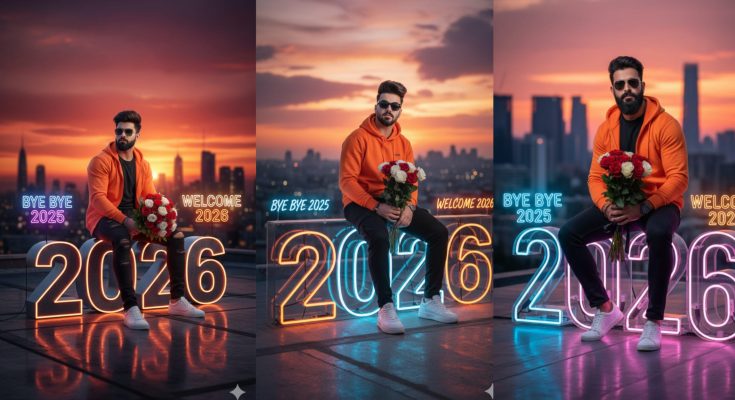
Imagine it is the stroke of midnight. The sky is exploding with colors, people are cheering, and the energy is electric. You want to share that perfect “Happy New Year 2026” post on Instagram or WhatsApp, but a standard stock photo just won’t cut it. You want something unique, cinematic, and personal.
In 2026, AI has made it possible for anyone to become a digital artist. With the right Happy New Year 2026 prompt, you can generate breathtaking images of futuristic cityscapes, cozy family gatherings, or high-fashion celebrations in seconds.
At ApkMale, we are committed to helping you navigate the world of AI creativity. Whether you are using Midjourney, DALL-E 3, or Bing Image Creator, this guide will provide the exact prompts you need to stand out this holiday season.
Why AI Prompts are the Secret to a Viral New Year
Gone are the days of searching through thousands of overused images online. Today, the “main character” energy comes from original content. A well-crafted prompt tells the AI exactly what you want—the lighting, the mood, and even the specific “2026” branding.
Using high-quality AI tools from ApkMale allows you to skip the learning curve. You don’t need to be a prompt engineer to get professional results; you just need a clear idea and the right set of keywords to unlock the AI’s full potential.
Best Happy New Year 2026 AI Prompts
To help you get started, we have categorized the best trending prompts for 2026. Simply copy and paste these into your favorite AI generator.
1. The Futuristic City Celebration
“A hyper-realistic 8k image of a futuristic New York City during the 2026 New Year celebration. Giant holographic ‘2026’ numbers floating in the sky, vibrant fireworks reflecting on glass skyscrapers, crowds cheering in the streets, cinematic lighting, neon blue and gold color palette.”
2. The 3D Pixar-Style Greeting
“A cute 3D animated style character holding a sparkling ‘Happy New Year 2026’ sign. Bright, cheerful colors, soft studio lighting, festive background with confetti and balloons, high-detail textures, 4k render.”
3. The Cozy “New Year, New Me” Vibe
“A cinematic shot of a person sitting by a window overlooking a snowy city at night. On the table is a diary with ‘2026 Goals’ written on it and a steaming cup of coffee. Warm indoor lighting, bokeh effect on the city lights outside, peaceful and inspiring atmosphere.”
4. The Luxury Gold & Black Aesthetic
“Elegant New Year 2026 greeting card design. Minimalist black background with premium 3D gold lettering ‘2026’. Luxury champagne glasses, golden confetti, sharp focus, professional product photography style.”
Step-by-Step Guide: How to Generate and Share Your 2026 Art
Ready to create? Follow these simple steps to ensure your New Year images look professional and ready for AdSense-friendly blogs or social media.
Step 1: Choose Your AI Tool
Pick a reliable AI image generator. If you are looking for unlocked features or pro versions of popular mobile editing apps, check the latest updates on ApkMale.
Step 2: Enter the “Anchor” Keywords
Always include the year “2026” and the phrase “Happy New Year” at the beginning of your prompt. This gives the AI the core context before you add the stylistic details.
Step 3: Define the Lighting and Style
Do you want it to look like a photo or a painting? Add words like “Photorealistic,” “Hyper-detailed,” “Oil painting,” or “Cyberpunk” to control the final look.
Step 4: Refine the “2026” Text
AI sometimes struggles with text. If the “2026” looks weird, use the “Generative Fill” or “Inpaint” tool to select the text area and re-prompt specifically for the numbers.
Step 5: Upscale and Edit
Once generated, use an AI upscaler to make the image sharp. You can find many such tools on ApkMale. Finally, add your own branding or a personal message using a photo editor.
Benefits of Using Custom AI Prompts
Why should you bother with prompts instead of just downloading a free image?
- Uniqueness: No one else will have the exact same image as you.
- Consistency: You can create a whole series of posts (Instagram, Facebook, Twitter) that all have the same visual style.
- Control: You can match the colors of your New Year art to your personal brand or website theme.
- Cost-Effective: Generating your own art is often much cheaper than buying premium stock photos.
At ApkMale, we believe that providing these resources empowers creators to build more engaging and high-quality websites.
Common Problems & Simple Solutions
Problem: The AI spelled “2026” incorrectly.
- Solution: This is a common AI quirk. Try the prompt again, or use a “Text-to-Image” model that specializes in typography, like DALL-E 3. Alternatively, generate the image without text and add “2026” manually in Canva.
Problem: The image looks too “fake” or “plastic.”
- Solution: Add keywords like “Analog film grain,” “Natural lighting,” or “Shot on 35mm lens.” This adds a layer of realism that removes the typical AI “sheen.”
Problem: The app keeps asking for a subscription.
- Solution: Many AI apps have daily limits. To find versions with extended features or better accessibility, visit ApkMale for the best mobile AI recommendations.
Following Google E-E-A-T Guidelines for AI Content
When sharing your AI-generated Happy New Year 2026 art, it is important to be transparent. Google values Experience, Expertise, Authoritativeness, and Trustworthiness.
- Transparency: Mention that the image was created using AI.
- Originality: Don’t just post the image; add your own expert tips on how you achieved that specific look.
- Quality over Quantity: One stunning AI image is better than ten blurry ones.
By providing value-added content alongside your images, like this guide from ApkMale, you build a more trustworthy relationship with your audience.
Frequently Asked Questions (FAQs)
1. Which AI is best for a Happy New Year 2026 prompt? Midjourney is currently the leader for cinematic art, while Bing Image Creator (powered by DALL-E) is the most beginner-friendly and free option for 2026.
2. Can I use these images on my AdSense-monetized blog? Yes, as long as you follow the AI usage policies of the generator you use. Most platforms allow commercial use, but it is always best to double-check their latest 2026 terms.
3. How do I make the fireworks look more realistic? In your prompt, use the phrase “Long exposure photography” or “Light trails.” This creates the beautiful “streaking” effect seen in professional fireworks photography.
4. Is it safe to download AI apps from ApkMale? Yes, ApkMale provides scanned and verified files to ensure your device stays secure while you explore the latest tech.
5. How long should my AI prompt be? A good prompt is usually between 20 to 50 words. Too short, and the AI guesses too much; too long, and the AI gets confused.
Conclusion
The Happy New Year 2026 prompt is your gateway to a more creative and visually stunning digital presence. Whether you want to inspire your followers with a cozy resolution photo or dazzle them with a futuristic city, AI gives you the power to do it all.
Remember to experiment with different styles and don’t be afraid to tweak your prompts. For more AI tips, premium app updates, and tech guides, keep visiting ApkMale. Let’s make 2026 your most creative year yet!